
Offering Several MFA Methods on an Existing CodeIgniter Shield App
If you’ve already added one MFA method to your Shield app, say, the TOTP plugin from an earlier post, you’ll have hit a real limit sooner or later: Config\Auth::$actions[‘login’] only accepts a single class name. Out of the box, Shield makes you pick one MFA method for your whole app.
Shield MFA Dispatcher works around that. It gives Shield exactly one class, the dispatcher, which then decides, per user, at the moment they log in, which real method to hand off to. This post walks through installing it on a site that already has one or more individual MFA plugins (TOTP, WhatsApp, Passkey, or your own) in place, and turning them into a set of options users can choose between.
What this actually unlocks
- Offer several MFA methods at once — email, WhatsApp, an authenticator app, a passkey, or anything else you write yourself.
- Let a user change their preferred method any time from a settings page — no admin step, no redeploy.
- Add or remove a method for the whole app by editing one config array. Config\Auth::$actions itself never has to change again.
It’s designed to sit alongside the individual method plugins — TOTP, WhatsApp, Passkey, not replace them. Each of those still does its own job; the dispatcher just decides which one applies to which user.
What you’ll need
- A CodeIgniter 4 app already running CodeIgniter Shield.
- One or more MFA method plugins already installed — this post assumes you’ve already got shield-totp-mfa working (from the earlier post), and optionally shield-whatsapp-mfa and/or shield-passkey-mfa too. Shield’s own built-in Email2FA works as a method here as well, with nothing extra to install.
1. Install the package
composer require cloudrepublic/shield-mfa-dispatcher
Then run the setup command:
php spark mfa-dispatcher:setup
This publishes Config/MfaDispatcher.php and the language file into your app.
2. Register whichever methods you have installed
In app/Config/MfaDispatcher.php:
public array $methods = [
    'email'    => \CodeIgniter\Shield\Authentication\Actions\Email2FA::class,
    'whatsapp' => \WhatsAppMfa\Authentication\Actions\WhatsAppMfa::class,
    'totp'     => \TotpMfa\Authentication\Actions\TotpMfa::class,
    'passkey'  => \PasskeyMfa\Authentication\Actions\PasskeyMfa::class, // login only, see note below
];
public string $defaultMethod = 'email';
Only list the methods you’ve actually installed — leave the others out. (If you list one you haven’t installed, or vice versa, the dispatcher and settings page both degrade gracefully rather than throwing a fatal error — see the plugin’s full README.)
Note on passkey: this wires up login verification only. Unlike TOTP, this package’s settings page doesn’t have a dedicated passkey enrollment flow — link users to shield-passkey-mfa’s own settings page separately if you offer this method (account/passkeys)
3. Point Shield at the dispatcher — and only the dispatcher
This is the key step, and the one most likely to catch you out if you’re migrating from a single-method setup. In app/Config/Auth.php:
public array $actions = [
    'register' => null,
    'login'    => \MfaDispatcher\Authentication\Actions\MfaDispatcher::class,
];
Do not also list Email2FA, WhatsAppMfa, or TotpMfa directly here anymore — if you were using one of those plugins on its own before, this line is what changes. The dispatcher is now the only thing Shield calls; it handles picking between the others internally.
4. Add the routes
Copy the relevant routes from routes-snippet.php into app/Config/Routes.php, and link to account/mfa from your account settings page.
Walking through the user experience
Settings page
A user visiting account/mfa sees their current method, with the option to switch to any other method you’ve registered.
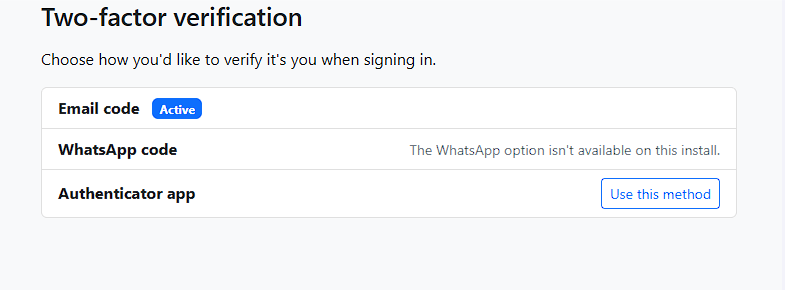
The MFA settings page, showing the current method and a list of alternatives to switch to.
Switching methods
Picking a different method takes them through that method’s own setup, if it needs one, (e.g. scanning a QR code for TOTP) — switching to email needs no setup at all, since it works out of the box.
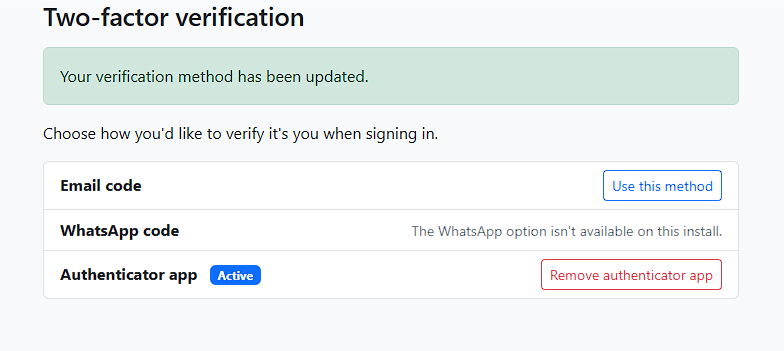
Switch to a new method, showing its setup step (e.g. TOTP’s QR code).
Logging in afterward
From their next login onward, they’re asked for whichever method they’ve selected — the dispatcher resolves this automatically each time, with no extra step for the user beyond what that method itself requires.
Changing a user’s method yourself
The settings page is really just a thin UI over a library class you can also call directly, useful for a support tool, an admin panel, or a one-off migration script:
use MfaDispatcher\Libraries\MfaPreference;

$preference = new MfaPreference();

$preference->set($user, 'whatsapp'); // switch them to WhatsApp
$preference->get($user);              // 'whatsapp'
$preference->clear($user);            // back to the configured default
Optional: requiring specific methods for specific roles
Beyond letting users pick freely, you can turn MFA on for a group, or mandate a specific method for it, useful for “admins must use an authenticator app, not email”:
// Switches MFA on for these groups even if it's otherwise optional
public array $enabledForGroups = ['admin', 'superadmin'];

// A user in one of these groups MUST use that specific method —
// their own preference is overridden, and if they haven't set it up
// yet, they're walked through that method's enrollment inline, as
// part of logging in.
public array $requiredMethodsForGroups = [
    'admin' => 'totp',
    'user'  => 'whatsapp',
];
Both are editable at runtime too, from your own admin UI, without a redeploy:
service('settings')->set('MfaDispatcher.requiredMethodsForGroups', ['admin' => 'totp']);
Optional: step-up auth that follows whatever the user logs in with
If you’re already using a step-up filter from one of the individual plugins (RequireFreshTotp, RequireFreshWhatsApp, etc.), this package has its own counterpart, RequireFreshMfa, that automatically resolves to whichever method the user actually logs in with, so you don’t need to keep several different filters in sync by hand as users change their preference, in app/Config/Filters.php setup an alias:
public array $aliases = [
    'mfa-fresh' => \MfaDispatcher\Filters\RequireFreshMfa::class,
];
A user who logs in with WhatsApp gets challenged with WhatsApp for step-up; one who logs in with TOTP gets challenged with TOTP — automatically, with no extra configuration needed for the common case.
Note: You also need to update the $stepUpFilterClasses array in app/Config/MfaDispatcher.php by uncommenting the ones you want to be available. If you do not do this then no step up challenge will be made to the user and they will land where they requested to go, unchallenged!
Next update app/Config/Routes.php for those routes that require the step up authentication.
$routes->group('admin/billing', ['filter' => ['session', 'mfa-fresh']], static function ($routes) {
    $routes->get('stripe-settings', 'Admin\BillingController::index');
    $routes->post('stripe-settings', 'Admin\BillingController::update');
});
How All The Config & Flows Fit Together
When the dispatcher is setup for login, this is the flow and decisions it makes to determine what the user should be prompted with, or not, at login time.
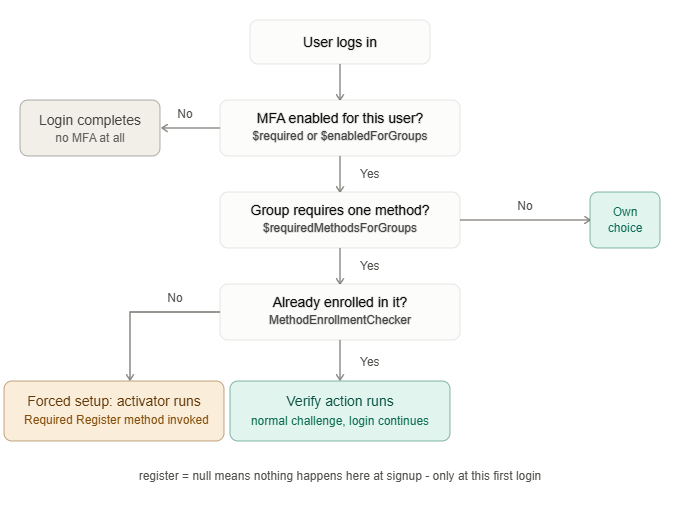
Example setups in Config/Auth::$actions and their associated flow via Dispatcher
| Register | Login | What happens at signup | What happens at login |
|---|---|---|---|
| Null | MfaDispatcher | Nothing — no MFA prompt at all | Dispatcher resolves per-user; if a required method isn’t enrolled yet, forced setup happens here instead |
| Null | A specific method (e.g. PasskeyMfa) | Nothing | That one method always challenges, no dispatcher logic at all |
| A specific activator (e.g. PasskeyActivator) | MfaDispatcher | That one method is always offered at signup (with skip, if configured) | Dispatcher resolves independently — may pick a different method than what was offered at signup |
Note: The MfaDispatcher class (\MfaDispatcher\Authentication\Actions\MfaDispatcher::class) is not meant to be used directly in the ‘Register’ action, make sure you use null or specify a valid Shield activator class for that.
Example setup in Config/MfaDispatcher settings and their associated effects via Dispatcher
| Setting | Controls | Interacts with |
|---|---|---|
| $required | MFA on for everyone, overriding groups entirely | If true, $enabledForGroups is never even checked |
| $enabledForGroups | Who gets MFA when $required is false | Only read when $required is false |
| $requiredMethodsForGroups | Overrides the user’s own preference with a mandated method | Only takes effect for users already covered by $required/$enabledForGroups above |
| $activatorClasses | Which class handles forced setup for a required-but-unenrolled method | Only consulted for methods listed in $requiredMethodsForGroups — a required method with no entry here throws, rather than silently failing |
| $defaultMethod | Fallback when no preference and no required method | Never overrides a required method |
Adding Your Own Custom MFA Method to Dispatcher
Shield-mfa-dispatcher ships with support for TOTP, WhatsApp, and Passkey login out of the box, alongside Shield’s own built-in email 2FA. But you’re not limited to those four. Everything in this package is built around method keys you define yourself in config, not a fixed list baked into the package. If you’ve built your own CodeIgniter Shield authentication action, a hardware security key, a push-notification approval flow, or anything else — you can plug it straight into the dispatcher’s existing group-based rules, user preferences, and forced-setup flow, without touching any of the package’s own source code.
Here’s how.
Step 1: Write your own login action
This is just a normal Shield ActionInterface implementation, getType(), createIdentity(), show(), handle(), verify() — exactly as you’d write it for direct use in Config\Auth::$actions. There’s nothing dispatcher-specific required at this stage; if your action already works as a standalone Shield login method, it’s ready for the next step as-is.
Step 2: Register it in $methods
In app/Config/MfaDispatcher.php:
public array $methods = [
    'email'   => \CodeIgniter\Shield\Authentication\Actions\Email2FA::class,
    'yubikey' => \App\Authentication\Actions\YubikeyMfa::class,
];
That’s genuinely enough on its own for a user to choose ‘yubikey’ as their own preference and have it work correctly. If you’re not also requiring this method for specific groups, you’re done here, the dispatcher’s plain preference-based resolution already understands any key you add.
Step 3: Add registration-time enrollment (optional)
If you want users to be able to set this method up, either at signup, or via a “forced setup” step when their group requires it, write an activator action too, following the same shape as TotpActivator, WhatsAppActivator, or PasskeyActivator from the sibling packages in this series.
One detail matters here specifically: each of those activators implements Shield’s ConditionalActionInterface, via an appliesTo(User $user): bool method that returns false once the user is already enrolled. Skip this, and Shield can end up treating your registration action as still “pending” for a user long after they’ve actually finished registering, implement it the same way to avoid issues:
public function appliesTo(User $user): bool
{
    return ! $this->store->hasEnrolled($user);
}
Then register the class:
public array $activatorClasses = [
    'yubikey' => \App\Authentication\Actions\YubikeyActivator::class,
];
Step 4: The step easiest to miss — register a custom enrollment checker
If you’re using $requiredMethodsForGroups to mandate your custom method for certain users, there’s one more registration step, and skipping it causes a genuinely confusing failure: every affected user gets routed into forced setup on every single login, forever, even seconds after they’ve successfully completed it.
Why: the dispatcher needs a way to check “has this specific user already set this method up?” before deciding whether to challenge them normally or force them through enrollment again. It already knows how to check this for TOTP, WhatsApp, and Passkey, but it has no way to guess how your method stores its own enrollment state. Without telling it, the check silently defaults to “not enrolled,” always.
The fix is a single config entry in app/Config/MfaDispatcher.php:
public array $customEnrollmentCheckers = [
    'yubikey' => [\App\Libraries\YubikeyIdentityStore::class, 'checkEnrollment'],
];
with a small static wrapper added to your own store class, it just needs to take a User and return true if that user has already enrolled:
class YubikeyIdentityStore
{
    public static function checkEnrollment(\CodeIgniter\Shield\Entities\User $user): bool
    {
        return (new self())->hasEnrolled($user);
    }

    public function hasEnrolled(\CodeIgniter\Shield\Entities\User $user): bool
    {
        // ... your own actual check
    }
}
This step is only needed if you’re using $requiredMethodsForGroups for your method. If users are just choosing it themselves as a preference, skip it, it has no effect on that path.
Step 5: Step-up support (optional)
If you want RequireFreshMfa (the step-up filter for sensitive pages) to be able to challenge specifically with your method, write your own filter implementing FilterInterface, and register it the same way:
public array $stepUpFilterClasses = [
    'yubikey' => \App\Filters\RequireFreshYubikey::class,
];
The full picture
None of these five steps require modifying the dispatcher package’s own source, every extension point is a config array your own app populates:
| Config array | What it’s for | Required? |
|---|---|---|
| $methods | Login-time verification action | Always |
| $activatorClasses | Registration/forced-setup enrollment action | Only if you want enrollment support |
| $customEnrollmentCheckers | How to check if a user has enrolled | Only if you’re requiring this method via $requiredMethodsForGroups |
| $stepUpFilterClasses | Step-up re-verification for sensitive pages | Only if you want step-up support |
Add whichever of these your own use case actually needs, a method only ever offered as a user preference needs just $methods; a method mandated for your admin group needs $methods, $activatorClasses, and $customEnrollmentCheckers together.
A full worked example: “Secret Word”
The steps above are abstract on purpose, since your own method could be almost anything. Here’s a genuinely complete, working example to see the actual shape of the code, deliberately not a real security mechanism (a shared word is exactly as weak as it sounds), just enough to demonstrate every integration point clearly. Everything below lives in your own app, not a separate package — plain app/ files.
The idea: at registration, a user picks a “secret word.” At every subsequent login, they’re asked to type it again as their second factor.
The store
Every method in this series keeps its own storage behind one small class. This one uses Shield’s own auth_identities table directly, the same place TOTP keeps its own secret.
One detail worth calling out: auth_identities has a UNIQUE(type, secret) constraint, so storing something a user choses themselves, a phone number, a method name, directly and unhashed will eventually collide the moment two users pick the same value. That’s not a risk here specifically because password_hash() includes its own random salt: even if two users pick the identical word, their stored hashes come out different. Hashing here isn’t just “best practice for a password-like value”, it’s also what keeps this table’s own unique constraint from ever colliding.
First create app/Libraries/SecretWordStore.php
<?php
// app/Libraries/SecretWordStore.php

namespace App\Libraries;

use CodeIgniter\Shield\Entities\User;
use CodeIgniter\Shield\Models\UserIdentityModel;

class SecretWordStore
{
    public const ID_TYPE = 'secretword';

    protected UserIdentityModel $identities;

    public function __construct()
    {
        $this->identities = model(UserIdentityModel::class);
    }

    public function hasEnrolled(User $user): bool
    {
        return $this->findRow($user) !== null;
    }

    public function setSecretWord(User $user, string $word): void
    {
        $hashed   = password_hash($word, PASSWORD_DEFAULT);
        $existing = $this->findRow($user);

        if ($existing !== null) {
            $this->identities->update($existing->id, ['secret' => $hashed]);

            return;
        }

        $this->identities->insert([
            'user_id' => $user->id,
            'type'    => self::ID_TYPE,
            'secret'  => $hashed,
        ]);
    }

    public function verify(User $user, string $word): bool
    {
        $row = $this->findRow($user);

        return $row !== null && password_verify($word, $row->secret);
    }

    /**
     * A static wrapper around hasEnrolled(), specifically so this can
     * be referenced as [self::class, 'checkEnrollment'] from
     * Config\MfaDispatcher::$customEnrollmentCheckers - that property's
     * own default value must be a compile-time constant, which a
     * [ClassName::class, 'method'] pair is (just two strings) but an
     * instance method call, or a Closure wrapping one, is not.
     */
    public static function checkEnrollment(User $user): bool
    {
        return (new self())->hasEnrolled($user);
    }

    /**
     * Returns the model's own entity object directly - findRow()
     * deliberately does NOT cast this to a plain array. A (array) cast
     * on an entity with protected/private properties mangles their key
     * names (PHP's own array-cast behavior for objects), which would
     * silently break $row->id/$row->secret access above.
     */
    private function findRow(User $user): ?\CodeIgniter\Shield\Entities\UserIdentity
    {
        return $this->identities
            ->where('user_id', $user->id)
            ->where('type', self::ID_TYPE)
            ->first();
    }
}
Next, the registration action
Prompts for a word at signup, following the same ConditionalActionInterface pattern the sibling packages in this series use — appliesTo() returning false once the user’s already set a word, so Shield stops treating registration as “still pending” the moment they have.
Next create app/Authentication/Actions/SecretWordActivator.php (Create the Authentication & Actions folders if they don’t already exist)
<?php
// app/Authentication/Actions/SecretWordActivator.php

namespace App\Authentication\Actions;

use App\Libraries\SecretWordStore;
use CodeIgniter\HTTP\IncomingRequest;
use CodeIgniter\HTTP\Response;
use CodeIgniter\Shield\Authentication\Actions\ActionInterface;
use CodeIgniter\Shield\Authentication\Actions\ConditionalActionInterface;
use CodeIgniter\Shield\Authentication\Authenticators\Session;
use CodeIgniter\Shield\Entities\User;
use CodeIgniter\Shield\Exceptions\RuntimeException;

class SecretWordActivator implements ActionInterface, ConditionalActionInterface
{
    protected SecretWordStore $store;

    public function __construct()
    {
        $this->store = new SecretWordStore();
    }

    public function appliesTo(User $user): bool
    {
        return ! $this->store->hasEnrolled($user);
    }

    public function show(): string
    {
        return view('secretword_enroll');
    }

    public function handle(IncomingRequest $request): Response
    {
        return service('response')->setBody($this->show());
    }

    public function verify(IncomingRequest $request): Response
    {
        $word = trim((string) $request->getPost('secret_word'));

        if ($word === '') {
            return redirect()->back()->withInput()->with('error', 'Please enter a secret word.');
        }

        $user = $this->getPendingUser();
        $this->store->setSecretWord($user, $word);

        $this->completePendingAction($user);

        auth('session')->getAuthenticator()->getUser()->activate();

        return redirect()->to(config('Auth')->registerRedirect())
            ->with('message', lang('Auth.registerSuccess'));
    }

    public function getType(): string
    {
        return SecretWordStore::ID_TYPE;
    }

    public function createIdentity(User $user): string
    {
        // Nothing meaningful to store yet - the user hasn't chosen
        // their word until verify() runs. An empty placeholder row is
        // enough for Shield's own pending-check to find something -
        // setSecretWord() above updates this same row in place rather
        // than inserting a second one.
        $this->store->setSecretWord($user, bin2hex(random_bytes(8)));

        return '';
    }

    protected function getPendingUser(): User
    {
        /** @var Session $authenticator */
        $authenticator = auth('session')->getAuthenticator();
        $user          = $authenticator->getPendingUser();

        if ($user === null) {
            throw new RuntimeException('SecretWordActivator: cannot get the pending registration user.');
        }

        return $user;
    }

    protected function completePendingAction(User $user): void
    {
        $field           = setting('Auth.sessionConfig')['field'];
        $sessionUserInfo = session($field) ?? [];
        unset($sessionUserInfo['auth_action'], $sessionUserInfo['auth_action_message']);
        session()->set($field, $sessionUserInfo);

        /** @var Session $authenticator */
        $authenticator = auth('session')->getAuthenticator();
        $authenticator->completeLogin($user);
    }
}
The login action
Verification-only — asks for the word again and checks it against the stored hash.
Next create app/Authentication/Actions/SecretWordMfa.php
<?php
// app/Authentication/Actions/SecretWordMfa.php

namespace App\Authentication\Actions;

use App\Libraries\SecretWordStore;
use CodeIgniter\HTTP\IncomingRequest;
use CodeIgniter\HTTP\Response;
use CodeIgniter\Shield\Authentication\Actions\ActionInterface;
use CodeIgniter\Shield\Authentication\Authenticators\Session;
use CodeIgniter\Shield\Entities\User;
use CodeIgniter\Shield\Exceptions\RuntimeException;

class SecretWordMfa implements ActionInterface
{
    protected SecretWordStore $store;

    public function __construct()
    {
        $this->store = new SecretWordStore();
    }

    public function show(): string
    {
        return view('secretword_verify');
    }

    public function handle(IncomingRequest $request): Response
    {
        return service('response')->setBody($this->show());
    }

    public function verify(IncomingRequest $request): Response
    {
        $user = $this->getPendingUser();
        $word = trim((string) $request->getPost('secret_word'));

        if ($word === '' || ! $this->store->verify($user, $word)) {
            return redirect()->back()->withInput()->with('error', 'That secret word was not correct.');
        }

        $this->completePendingAction($user);

        return redirect()->to(config('Auth')->loginRedirect())
            ->with('message', 'Logged in successfully.');
    }

    public function getType(): string
    {
        return SecretWordStore::ID_TYPE;
    }

    public function createIdentity(User $user): string
    {
        // Already exists by the time this ever runs - Shield only
        // reaches this action for a user because SecretWordActivator's
        // row (same type) is already there. A genuine no-op.
        return '';
    }

    protected function getPendingUser(): User
    {
        /** @var Session $authenticator */
        $authenticator = auth('session')->getAuthenticator();
        $user          = $authenticator->getPendingUser();

        if ($user === null) {
            throw new RuntimeException('SecretWordMfa: cannot get the pending login user.');
        }

        return $user;
    }

    protected function completePendingAction(User $user): void
    {
        $field           = setting('Auth.sessionConfig')['field'];
        $sessionUserInfo = session($field) ?? [];
        unset($sessionUserInfo['auth_action'], $sessionUserInfo['auth_action_message']);
        session()->set($field, $sessionUserInfo);

        /** @var Session $authenticator */
        $authenticator = auth('session')->getAuthenticator();
        $authenticator->completeLogin($user);
    }
}
The views for the user
These are bare-minimum forms to show the concept so you would style these however they fit with your own app.
Finally create app/Views/secretword_enroll.php and app/Views/secretword_verify.php
<?php // app/Views/secretword_enroll.php ?>
<h1>Choose a secret word</h1>
<p>You'll be asked to enter this again every time you log in.</p>

<?php if (session('error')) : ?>
    <p style="color: red;"><?= esc(session('error')) ?></p>
<?php endif ?>

<form method="post" action="<?= url_to('auth-action-verify') ?>">
    <?= csrf_field() ?>
    <label for="secret_word">Secret word</label>
    <input type="text" id="secret_word" name="secret_word" required autofocus>
    <button type="submit">Continue</button>
</form>
Code above for app/Views/secretword_enroll.php
<?php // app/Views/secretword_verify.php ?>
<h1>Enter your secret word</h1>

<?php if (session('error')) : ?>
    <p style="color: red;"><?= esc(session('error')) ?></p>
<?php endif ?>

<form method="post" action="<?= url_to('auth-action-verify') ?>">
    <?= csrf_field() ?>
    <label for="secret_word">Secret word</label>
    <input type="text" id="secret_word" name="secret_word" required autofocus>
    <button type="submit">Log in</button>
</form>
Code above for app/Views/secretword_verify.php
Wiring it up
Now the classes and views have been created we just need to update the configuration values to use our new authenticator!
In app/Config/MfaDispatcher.php, update the appropriate arrays:
// app/Config/MfaDispatcher.php

public array $methods = [
    'email'      => \CodeIgniter\Shield\Authentication\Actions\Email2FA::class,
    'secretword' => \App\Authentication\Actions\SecretWordMfa::class,
];

public array $activatorClasses = [
    'secretword' => \App\Authentication\Actions\SecretWordActivator::class,
];

// Only needed if you're also requiring this method for a specific
// group via $requiredMethodsForGroups - a user just choosing it as
// their own preference doesn't need this entry at all.
public array $customEnrollmentCheckers = [
    'secretword' => [\App\Libraries\SecretWordStore::class, 'checkEnrollment'],
];
And in app/Config/Auth.php, to offer it at registration too:
public array $actions = [
    'register' => \App\Authentication\Actions\SecretWordActivator::class,
    'login'    => \MfaDispatcher\Authentication\Actions\MfaDispatcher::class,
];
Update the Dispatcher Label for your User Preferences
In app/Language/en/MfaDispatcher.php update the array to add the key
methodLabel_<your class key> (e.g. methodLabel_secretword) so that your users get a nice readable label for when they want to select a new preference in the /account/mfa page.
'methodLabel_secretword' => 'Secret word',
That’s the whole thing — a user registers, picks a word, and from then on the dispatcher treats ‘secretword’ exactly like any of the built-in methods: selectable as a preference, requirable per group, and (with the checker above registered) safe from the forced-setup loop covered earlier in this tutorial.
Note: If you were to make a specific method required in app/Config/MfaDispatcher.php, and in our case Secret Word, all other methods are disabled if you view the standard account/mfa page, so consider implementing something similar so that users do not become confused with any potential options displayed, when the underlying config overrides anything the user could potentially choose here.
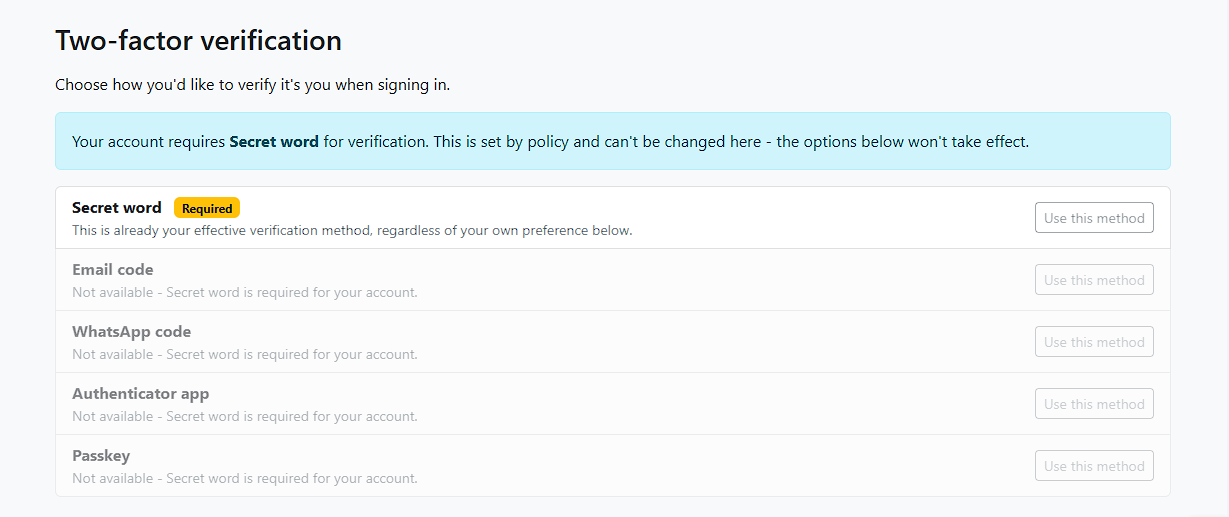
Showing it on the account/mfa page
Once ‘secretword’ is in $methods, it just shows up as an option on the dispatcher’s own settings page (account/mfa) alongside email, TOTP, and anything else you’ve registered, no extra work needed for that part.
The settings page’s “Use this method” button calls choose(), which checks whether a user had actually set a method up already, by running a generic enrollment check, via the same MethodEnrollmentChecker mechanism already used for $requiredMethodsForGroups. For any custom methods, not already covered by the base checks for options such as TOTP, email, WhatsApp etc., a new config property tells it where to send an unenrolled user:
// app/Config/MfaDispatcher.php
public array $customEnrollmentRoutes = [
    'secretword' => 'secretword-enroll',
];
If a method has no entry here and the user hasn’t set it up, choose() refuses outright, with an error message, “no change made”, rather than letting a bypass happen. Routing them somewhere useful is the better experience though, so let’s actually build that destination.
A self-service page to set a secret word
The activator we built earlier only runs during registration or forced setup, there’s no standalone way for an already-logged-in user to set (or change) their secret word from the settings page on its own. A small, dedicated controller fills that gap:
<?php
// app/Controllers/SecretWordSettingsController.php

namespace App\Controllers;

use App\Libraries\SecretWordStore;
use CodeIgniter\Controller;
use CodeIgniter\HTTP\RedirectResponse;

class SecretWordSettingsController extends Controller
{
    public function enroll(): string
    {
        return view('secretword_settings_enroll');
    }

    public function save(): RedirectResponse
    {
        $user = auth()->user();
        $word = trim((string) $this->request->getPost('secret_word'));

        if ($word === '') {
            return redirect()->back()->withInput()->with('error', 'Please enter a secret word.');
        }

        (new SecretWordStore())->setSecretWord($user, $word);

        return redirect()->route('mfa-settings')->with('message', 'Secret word saved.');
    }
}
Along with it’s own view:
<?php // app/Views/secretword_settings_enroll.php ?>
<h1>Set your secret word</h1>

<?php if (session('error')) : ?>
    <p style="color: red;"><?= esc(session('error')) ?></p>
<?php endif ?>

<form method="post" action="<?= url_to('secretword-enroll-save') ?>">
    <?= csrf_field() ?>
    <label for="secret_word">Secret word</label>
    <input type="text" id="secret_word" name="secret_word" required autofocus>
    <button type="submit">Save</button>
</form>
And the two routes it needs.
Note: These live behind your normal ‘session’ (logged-in) filter, not the pre-login auth/a/… group the activator/login action routes use, since this page is only ever reached by someone already authenticated:
$routes->get('account/secretword', 'SecretWordSettingsController::enroll', ['as' => 'secretword-enroll', 'filter' => 'session']);

$routes->post('account/secretword', 'SecretWordSettingsController::save', ['as' => 'secretword-enroll-save', 'filter' => 'session']);
Now the full loop actually works end to end: a user without a secret word clicks “Use this method,” gets redirected here instead of the choice silently going through, sets a word, and only then does choosing ‘secretword’ on the settings page actually take effect for that user.
That’s it!
Your app can now offer several MFA methods side by side, even one you have rolled your own, with users choosing their preferred method, and (optionally) specific roles required to use a specific one. From here, the plugin’s full README covers graceful degradation, view overrides, and the full test suite if you need to go further.
Questions about setting this up on your own site, get in touch.